
22 Best Squarespace Portfolio Examples In 2026
Here’s our list of the best Squarespace portfolio examples to motivate your creativity.
You can use a portfolio website builder, like Squarespace, to create a fabulous online presence even if you have 0 design or programming skills.
Present your projects in the best possible light through an elegant grid, utilize lightbox functionality for improved content viewing, and craft a compelling ‘About Me’ page.
Some of these portfolio pages also feature an eCommerce section and a blog, which you can utilize to enhance the overall experience.
Check. Get inspired. Copy. And improve (with your creative tweaks).
We also have a more general collection of the best Squarespace website examples you should not miss.
Best Squarespace Portfolio Examples
1. Lisa Maltby
Built with: Squarespace

Lisa Maltby’s portfolio page is simple but bold, thanks to the large, three-column grid layout. What’s also cool about the grid is that some elements are static, while others are animated, making it more engaging.
Moreover, the header and the footer are minimalist, with the necessary links for easy navigation.
What stands out: Use your home page to showcase your latest and greatest works first thing.
2. Gina Kirlew
Built with: Squarespace

Gina Kirlew’s Squarespace portfolio is a lovely example of minimalism mixed with creativity.
We really like the use of the same background color throughout the entire website, including the header, the base, and the footer. It gives it a neater look and ensures that all the content pops even more.
Additionally, the navigation bar features a captivating hover effect, highlighting one link while dimming the rest.
What stands out: A minimalist website suits an online portfolio really well because it puts more shine on the works.
3. Clara De Lorenzi
Built with: Squarespace

Clara De Lorenzi’s simple online portfolio website greatest a pleasant atmosphere due to the full-width grid layout.
It features a hover functionality that displays the title when you place the cursor over it. When you click the project, it opens on a new page with additional details.
Plus, the drop-down navigation works great since Clara doesn’t have a search bar.
What stands out: Create better portfolio navigation with a drop-down menu.
4. Ann Gagliano
Built with: Squarespace

What’s notable about Ann Gagliano’s Squarespace portfolio is that she utilizes a traditional home page, complete with a link to her portfolio page and Instagram profile. (The custom background spices things up.)
Once on the illustrations page, you’ll see a gallery with thumbnails at the bottom that you can navigate with your keyboard, clicking or swiping. Or you can click on the thumbnails to open the full version.
What stands out: You can also create a gallery to showcase your works and projects instead of using a grid layout (the thumbnails at the bottom are convenient).
5. Rachel Sanson
Built with: Squarespace

Rachel Sanson sticks to simplicity, allowing her beautiful works to take center stage for your viewing pleasure. Her online portfolio features lightbox functionality for easier browsing through images.
The header and the footer are plain, with the main menu links and social media icons.
What stands out: Use the header or footer to link to your social media accounts and grow your profiles. You can also create a similar website using these Squarespace portfolio templates.
6. Luke Adam Hawker
Built with: Squarespace

Luke Adam Hawker’s Squarespace portfolio website also has a top bar notification in addition to the header and navigation bar.
The hero section features a large image accompanied by two CTA buttons, followed by a list of upcoming events, markets, and other relevant information.
Additionally, the footer contains a few quick links and a subscription form for the newsletter.
What stands out: Use a top bar notification to draw attention to a new product, special deal, or other important information.
7. Benjamin Hardman
Built with: Squarespace

Benjamin Hardman’s home page features a stunning image slider (without text and CTA buttons).
The navigation has a drop-down menu to find the necessary information and content faster, but there is no footer (only the about me page displays social icons).
What stands out: Create a slideshow to showcase your best works and projects, but avoid distracting from the experience with text and CTAs; keep it clean.
Grab more design inspiration by skimming through these best clean websites.
8. Jessica Chou
Built with: Squarespace

Jessica Chou’s Squarespace portfolio example is long, but the phenomenal images load on scroll, keeping the viewer in focus despite the fact that they’ve been scrolling for some time.
This website has only two more pages, along with a link to our Instagram profile, which opens in a new tab.
Jessica also doesn’t have a footer section. Advice: The home page would be more practical with a back-to-top button to avoid the (endless) back scroll after you get to the bottom, which isn’t too much fun.
What stands out: Enhance the user experience by loading content on scroll.
Looking to showcase your photographs online? Here are the most beautiful Squarespace photography website templates curated by professional web designers.
9. Samantha Keely Smith
Built with: Squarespace

What differentiates Samantha Keely Smith’s artist website from the rest is the sidebar header/menu. It also stays in view, so it’s always accessible (you don’t need to scroll back to reach it).
The home page has a large slider with additional information about the painting in the bottom left corner. You can also choose to see the entire portfolio as a grid of thumbnails.
What stands out: Go against the grain of traditional website structure by incorporating a sidebar header/navigation.
This website is as creative as it gets, thanks to its use of a drag-and-drop website builder. For more inspiration, please refer to this article for additional Squarespace artist website examples.
10. Devon Stank
Built with: Squarespace

Devon Stank knows how to trigger curiosity with a full-screen background video above the fold. The hero section also features a big title with a CTA and a play button. The latter opens a video in a popup, so you can close it anytime and continue enjoying the current page.
However, one of the main features of Devon’s Squarespace portfolio is the dark design, which gives it a premium, almost luxurious feel.
What stands out: Add a video above the fold to make the first encounter with your website more attention-grabbing.
11. Alex Naraghi
Built with: Squarespace

While most people start their online portfolios with visual content, Alex Naraghi decided to opt for a text-only approach on a white background. And that’s precisely what makes it unique!
The header and the footer maintain the same white background as the base, but the resume has a vivid green section with a download button to make it stand out more.
What stands out: Use vivid colors on light web design to highlight something in particular.
12. La Playa
Built with: Squarespace

First, La Playa is a Squarespace portfolio example featuring a gray background, which complements the orange details well. Second, it features a blog-like layout with a sticky right sidebar that includes accordions for additional information.
The base is a grid of projects with a hover effect, highlighting the one you place the cursor on and dimming the rest. Notably, all grid elements link to live projects, allowing everyone to view the finished products firsthand.
What stands out: Accordions are a nifty feature that keeps the initial look cleaner, but the practicality of showcasing extra information remains.
13. RyuCreative
Built with: Squarespace

RyuCreative features an attractive hero section, a collage of images with ample white space between them. The header features three main menu links and an Instagram icon, but this online portfolio lacks a footer.
The content appears as you scroll, making it more visually appealing. Furthermore, at the bottom of the page is a grid of Instagram posts, each opening on a new page.
What stands out: There’s no right or wrong way to create a catchy hero section. Go against the norm, like RyuCreative
14. Kelsey O’Halloran
Built with: Squarespace

Kelsey O’Halloran’s website has a very personal vibe with a large image of herself, a title, text and a CTA button.
The sectioned structure, featuring different background colors and creative elements, establishes a lovely presentation with sufficient white space for improved readability.
Kelsey is another one who added links to end products on her portfolio page so that everyone can view and “touch” the work.
What stands out: Use picture(s) of yourself and great storytelling to personalize your online portfolio. (You may also be interested in these top-notch personal websites.)
15. Mindy Nguyen
Built with: Squarespace

If text-only above-the-fold sections don’t appeal to you, but you’re not a fan of large images, you might copy what Mindy Nguyen did. Mixing text and GIFs – how smart!
Moreover, the home page showcases some of her works through images, titles, excerpts, and links to live projects.
Finally, the header and footer are on the plain side, featuring an ‘About’ link, a clickable email address, and social media icons.
What stands out: Adding GIFs and emojis to your text can add more life, which is a modern texting trend.
16. Olga Miljko
Built with: Squarespace

Olga Miljko’s portfolio will keep you scrolling with excitement, even though it’s quite lengthy. And when you reach the bottom, the clean footer provides additional business and contact information, as well as links to her Facebook and Instagram profiles.
Additionally, the header reappears to prevent users from scrolling back to the top, thereby enhancing the overall user experience.
What stands out: A header that disappears and reappears depending on the scrolling movement can enhance UX.
17. Mike Kelley
Built with: Squarespace

Mike Kelley is another rare Squarespace portfolio example find with sidebar navigation that floats.
The website is simple, with a great selection of typography for easier reading, even if the text tends to run smaller.
The home page also features an image slideshow, which transforms into a grid when you click on the arrow that points upward.
What stands out: Use simple fonts for smaller text to make it easier on the eyes.
18. Liam Foster
Built with: Squarespace

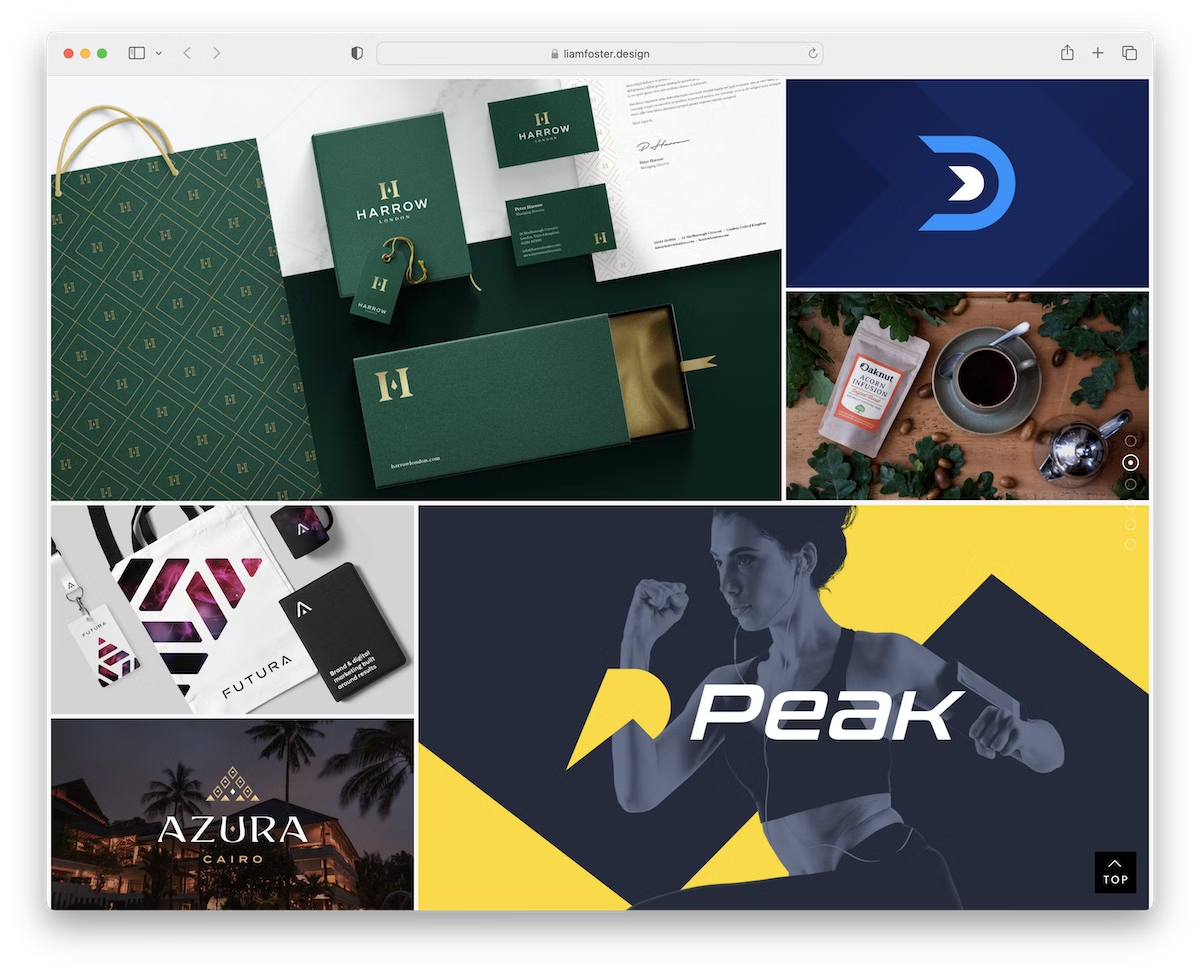
Liam Foster is one of the more “advanced” Squarespace portfolio examples because of the many sections, sticky sidebar navigation, back-to-top button and feature-rich footer.
Besides the navigation, the header has a CTA button to start a project with Liam immediately. Another page we like is the “process,” where Liam explains his work process so you know what to expect.
Note: Expose a call-to-action button to enjoy more clicks by placing it in the header.
19. Alex McDaris
Built with: Squarespace

Alex McDaris’ website lacks a hero section, instead transitioning directly to a large, two-column grid of works. Each thumbnail has a hover effect and a link to an individual page with a more extensive presentation.
And even though Alex created a very minimalist web design, she still played with font colors to make it more delightful.
Note: Mix a minimalist design with creative details to enliven it, like Alex did with typography.
20. Evan McDougall
Built with: Squarespace

Evan McDougall is a freelance industrial designer whose Squarespace portfolio puts product design front and center. The clean, image-forward layout showcases 3D renders and physical products with generous white space that lets each piece breathe and command attention.
The minimal navigation and grid-based project layout make it easy to browse through different design categories. Each project page features detailed shots, process work, and context that tells the full story behind every product.
What stands out: Generous white space and large product images create a gallery-like experience that elevates industrial design work — the portfolio design never competes with the work itself.
21. Kyle Steed
Built with: Squarespace

Kyle Steed is a Dallas-based artist specializing in public art, murals, and illustration. His Squarespace portfolio opens with bold, large-scale imagery of his mural work that immediately communicates the scale and energy of his artistic practice.
The navigation splits cleanly between Murals, Commissions, Illustration, and About — letting visitors find exactly what they need. The dark color scheme with vibrant project photography creates a dramatic backdrop that makes every piece pop.
What stands out: For artists working at large physical scales, showing murals and installations in context — on actual buildings and walls — communicates impact far better than cropped studio shots ever could.
22. Preston Konrad
Built with: Squarespace

Preston Konrad is an art director and designer whose minimalist Squarespace portfolio strips everything down to the essentials. The clean grid of project thumbnails with simple titles creates an organized, professional presentation that puts creative work first.
The monochrome navigation and generous spacing give the portfolio a refined, intentional feel. Each project gets its own dedicated page with detailed case study presentations that show both the final deliverables and the strategic thinking behind them.
What stands out: A stripped-back, minimalist portfolio design signals confidence — when the work is strong enough, it doesn’t need decorative elements competing for attention.

Related Posts

Comments (0)