

14 Best Squarespace Minimalist Templates 2026
If you like simplicity and cleanness in web design, these best Squarespace minimalist templates will be useful.
We know how overwhelming it can be to sift through endless options in search of the perfect template that strikes the right balance of efficiency and elegance.
That’s exactly why we’ve put together this handy guide.
From business to personal sites, we ensured that we included a design for everyone.
But it doesn’t end here.
You’re welcome to customize the template you like, personalize and brand it, and make it your own.
It’s so easy!
You’re just a few clicks away from making your website dreams a reality.
Table of contents — all 14 squarespace minimalist templates
- Hart
- Suhama
- Corrigan
- Pulaski
- Hawley
- Palmera
- Camdez
- Balboa
- Morena
- Chotto
- Emmeline
- Arthur
- Nolan
- Carmine
Also on this page: How To Make A Minimalist Website With Squarespace · FAQs About Squarespace Minimalist Templates
Best Squarespace Minimalist Templates
Below, you’ll find our list of the best Squarespace minimalist templates. These are perfect for creating a clean, modern, and elegant website.
Each design is chosen for its versatility, ease of use, and smooth way it lets your content shine.
1. Hart

Hart creates a strong and lasting first impression, mainly due to its black design.
The layout is clean and simple, with ample white space for improved readability. Moreover, the header remains at the top of the screen, ensuring that menu links and social media icons are always accessible.
On the other hand, the footer is quite plain, featuring only a link to contact.
Hart also has predefined pages for a lookbook/portfolio and a blog. An active blog can take your business to the next level, so consider starting a blog.
Note: See a collection of the best black websites for inspiration.
2. Suhama

What’s awesome about Suhama is its text-heavy, simplistic design, which will capture everyone’s interest.
The header only has a logo on the left and social media links on the right. Meanwhile, the footer features multiple columns for location and business details, but you can add other useful information.
Last, Suhama also works very well for building one-page websites. (I’m sure you’ll also like checking out these great Squarespace one-page website examples.)
3. Corrigan

First, the dark and light sections make Corrigan pop nicely. It’s another minimalistic Squarespace template that’s all about text and very little about visual content.
However, the well-structured layout and choice of typography make it easy to skim through, even if you decide to include a lot of written content.
You will also benefit from various predefined internal pages and an integrated contact form, eliminating the need to build from scratch.
Ideally, use Corrigan for a Squarespace law-related website. However, if you like it so much, you can also adapt it to another industry.
4. Pulaski

Pulaski is simplicity at its finest with a touch of liveliness, thanks to its color scheme.
It’s a Squarespace template that you can use to create a solid online presence for your personal brand, a resume, or a CV.
Additionally, consider starting a blog, including a contact page that allows clients to reach out easily, and adding links to your social media profiles.
Pulaski is no fluff, straight to the point.
5. Hawley
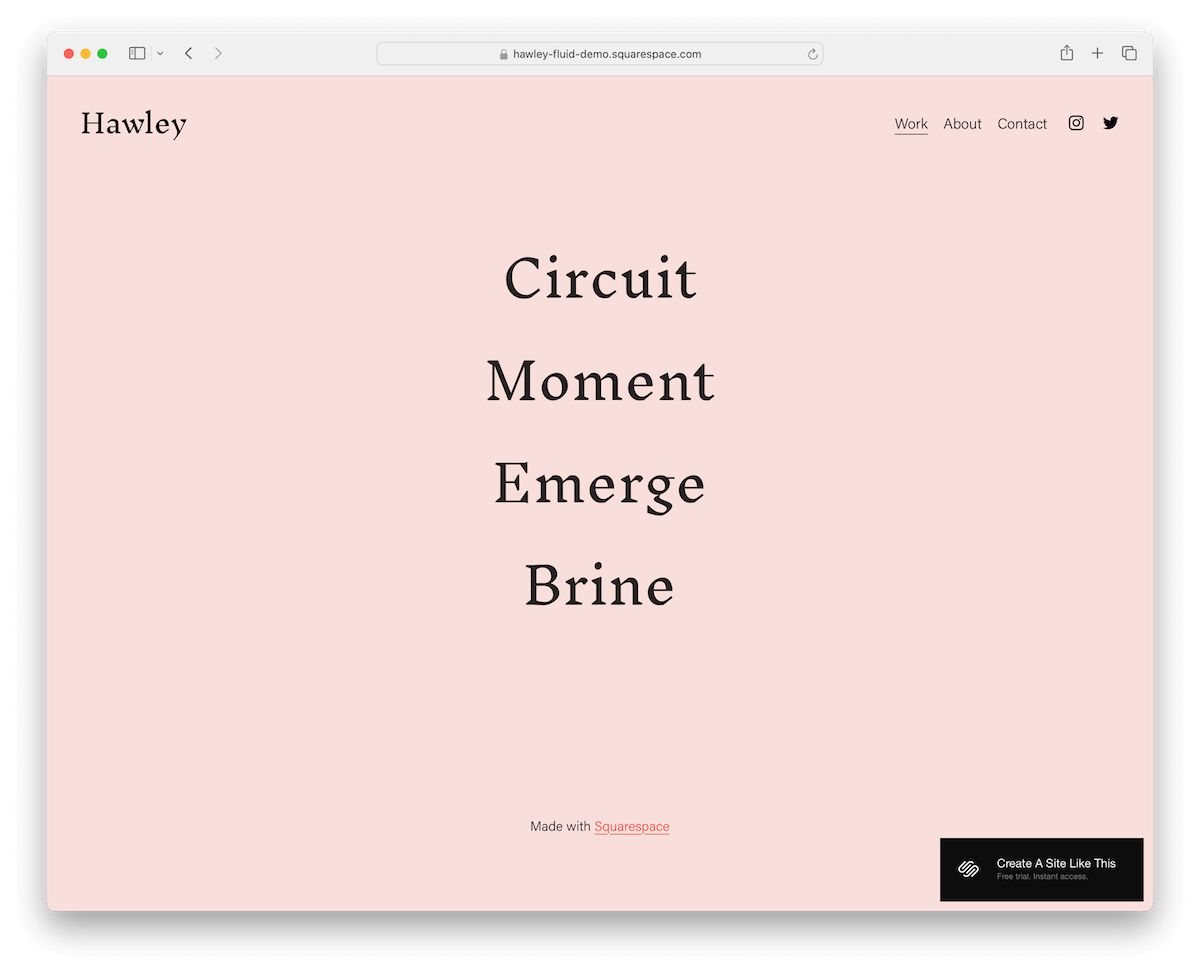
Nope, this is not another text-only minimalist Squarespace template.
The “hamburger” style links in the hero image react on hover, changing the entire background and enriching it with an image. Then, there are beautiful, full-width work/project pages with large, single-column image layouts that create a pleasant viewing experience.
Hawley’s About page is simple, but that’s precisely what makes it work so well.
Finally, you won’t need to create a contact form because it’s already pre-built for your convenience.
6. Palmera

If you want to enter the blogging space with a minimalist blog, you’d better opt for Palmera.
This Squarespace template’s home page has a single-column post layout, with thumbnails on the left and date, title, and excerpt on the right.
You’ll immediately notice the synchronized white background across the entire website, including the header, base, and footer.
Speaking of the footer, it has social media icons and a newsletter subscription form.
Wait, there’s more.
Palmera also contains ready-to-use About, Shop, and Contact pages.
Further reading:
7. Camdez
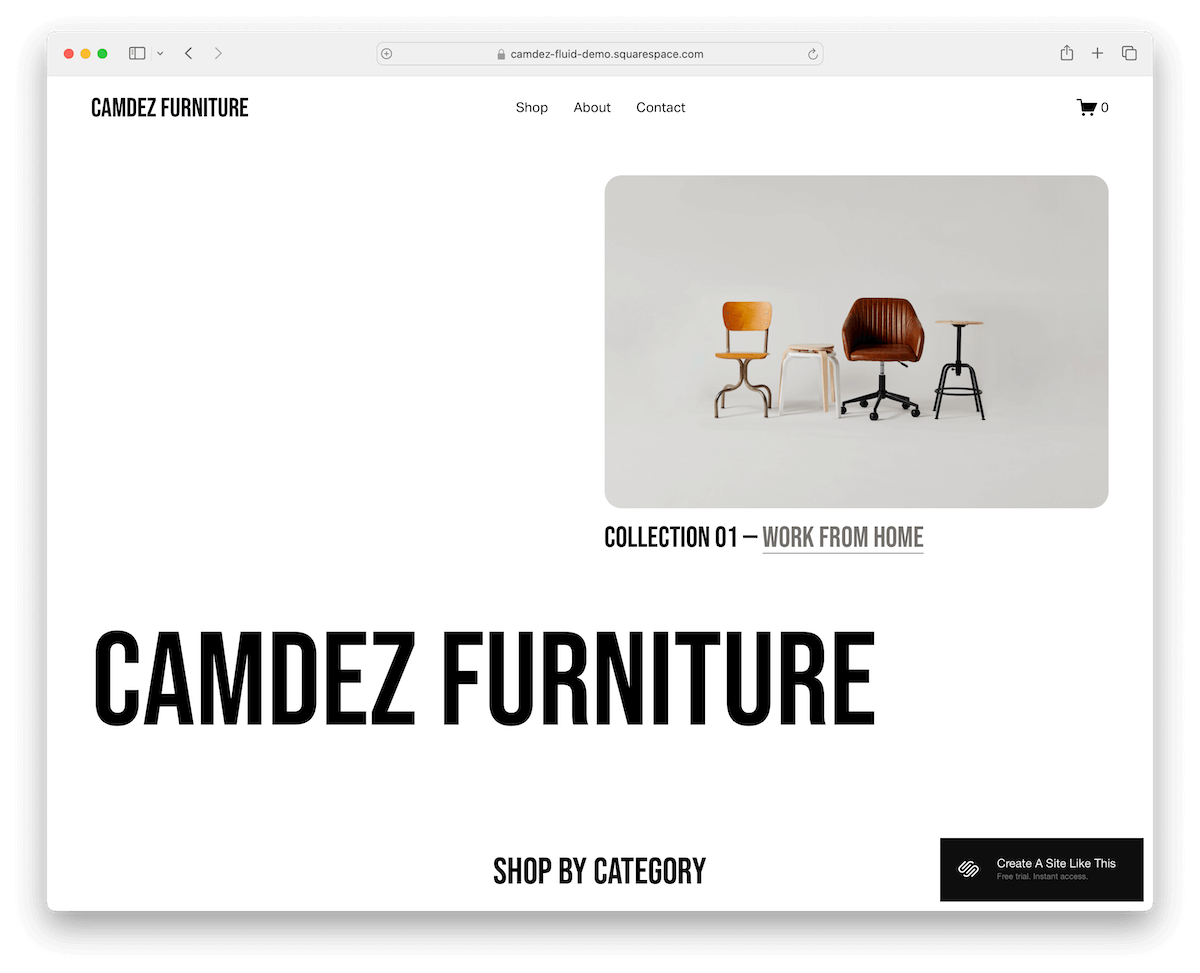
Do you need a minimalist Squarespace template to create an online store where your products are the star of the show?
Camdez is an excellent example, where images do all the talking. Furthermore, the text is bold and easy to read, with plenty of white space, ensuring top-notch readability.
Product pages are well-organized, featuring a zoom-in effect that allows users to view the item in more detail.
Create an about page to engage visitors and facilitate easy contact through a contact form – all this and more with Camdez.
8. Balboa

Create an impactful and memorable online portfolio with Balboa and WOW everyone who visits it.
And the best part? You don’t need to do much work to achieve a spectacular outcome. Yes, really.
The design is impressively clean, with large text and stunning image grids. Each project page also features lightbox functionality for an enhanced viewing experience.
While Balboa doesn’t come with a contact form, it does include a clickable email address and a link to Instagram for easy connection. Still, inserting a functional form into your site is easy with Squarespace.
Note: Don’t miss our list of the best Squarespace portfolio templates.
9. Morena

Check out Morena; it’s a super clean Squarespace template with a vibe that keeps things light and airy.
The coolest part? The header disappears when you scroll down and reappears when you scroll back up.
The navigation bar features an RSVP button, allowing guests to easily confirm their attendance.
Morena focuses more on your words than pictures, making it perfect for creating a unique Squarespace wedding site.
10. Chotto

Chotto is a minimalist Squarespace template for restaurants and food businesses, making mouths salivate right away.
The home page has no bloat, sharing location and an image of a (popular) dish; you can use it like that, too.
You also get other internal pages for the menu, chef presentation, reservations, and location with embedded Google Maps.
The header disappears and reappears depending on whether you scroll down or up for distraction-free browsing.
I also need to mention that Chotto features an online booking system powered by Tock, which makes running a restaurant even more convenient.
Working on a food site? Then take a look at these Squarespace restaurant templates for a quick build.
11. Emmeline
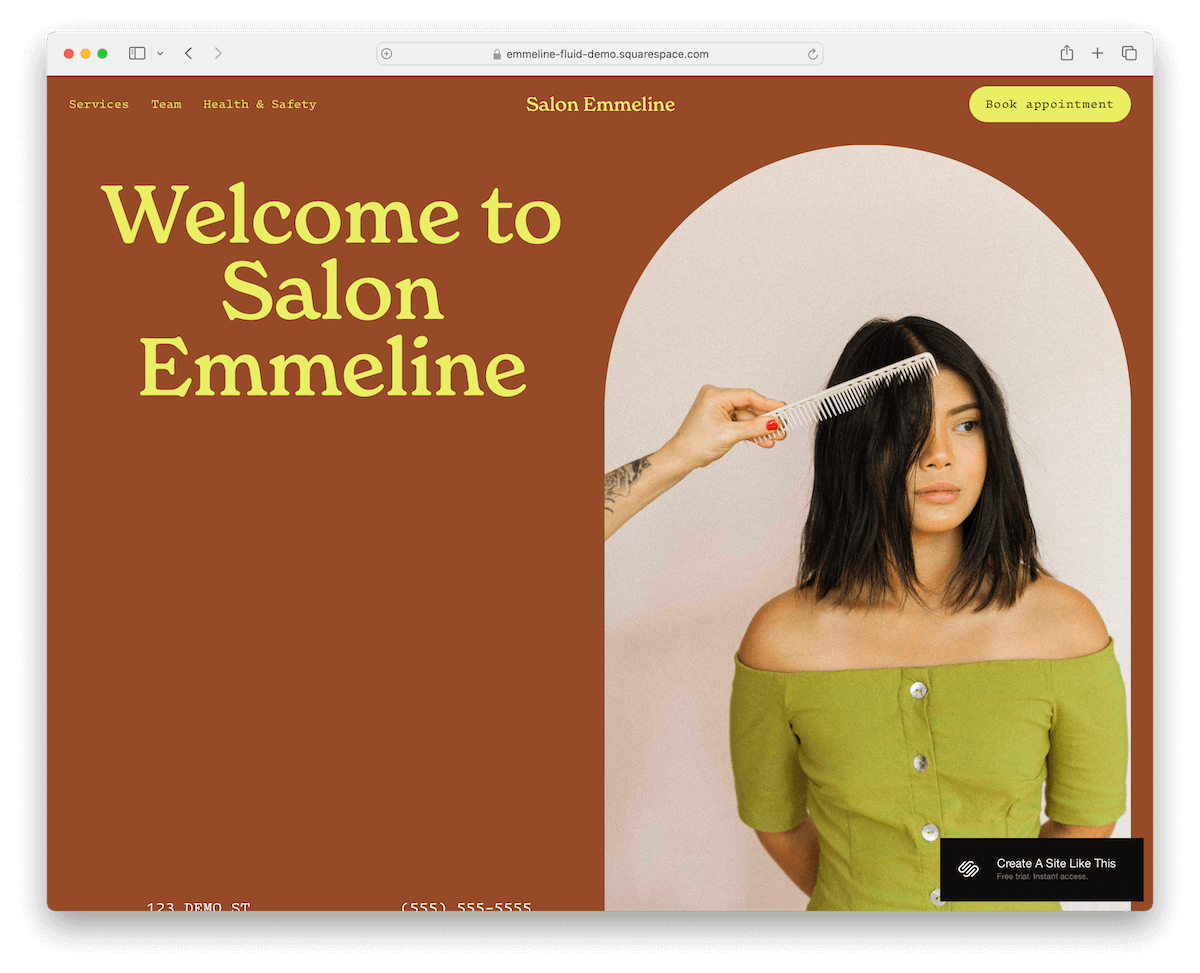
Emmeline is the Squarespace template that’s got it all for a sleek look.
Its sticky header stays put while you scroll, which, by the way, reveals content as you go – super smooth.
The full-width image backgrounds make the site pop nicely, keeping the attention glued to the screen.
And don’t miss the subscription form and a footer that slides text like it’s on a runway.
Last but not least, Emmeline offers to book appointments online directly.
12. Arthur

Arthur’s the Squarespace pick if you’re into showcasing your work with flair.
Its home page rocks a portfolio layout that’s anything but ordinary. Plus, when you click on an image, boom, it slides into a classy slideshow.
The header houses your menu, Instagram, and email icons without fuss. The footer is extremely streamlined and features only a spot for newsletter sign-ups.
Arthur is minimalist yet functional, perfect for making your work stand center stage.
13. Nolan

Nolan is the Squarespace template for those who dig contrasts. It plays cool with dark and light sections that make content pop.
The header vanishes as you scroll down and reappears when you scroll back up. On the contrary, the black footer houses all your essential links.
With dedicated pages for work, services, the company, and contact info, Nolan is designed for businesses that want a minimalist vibe without skimping on detail.
14. Carmine
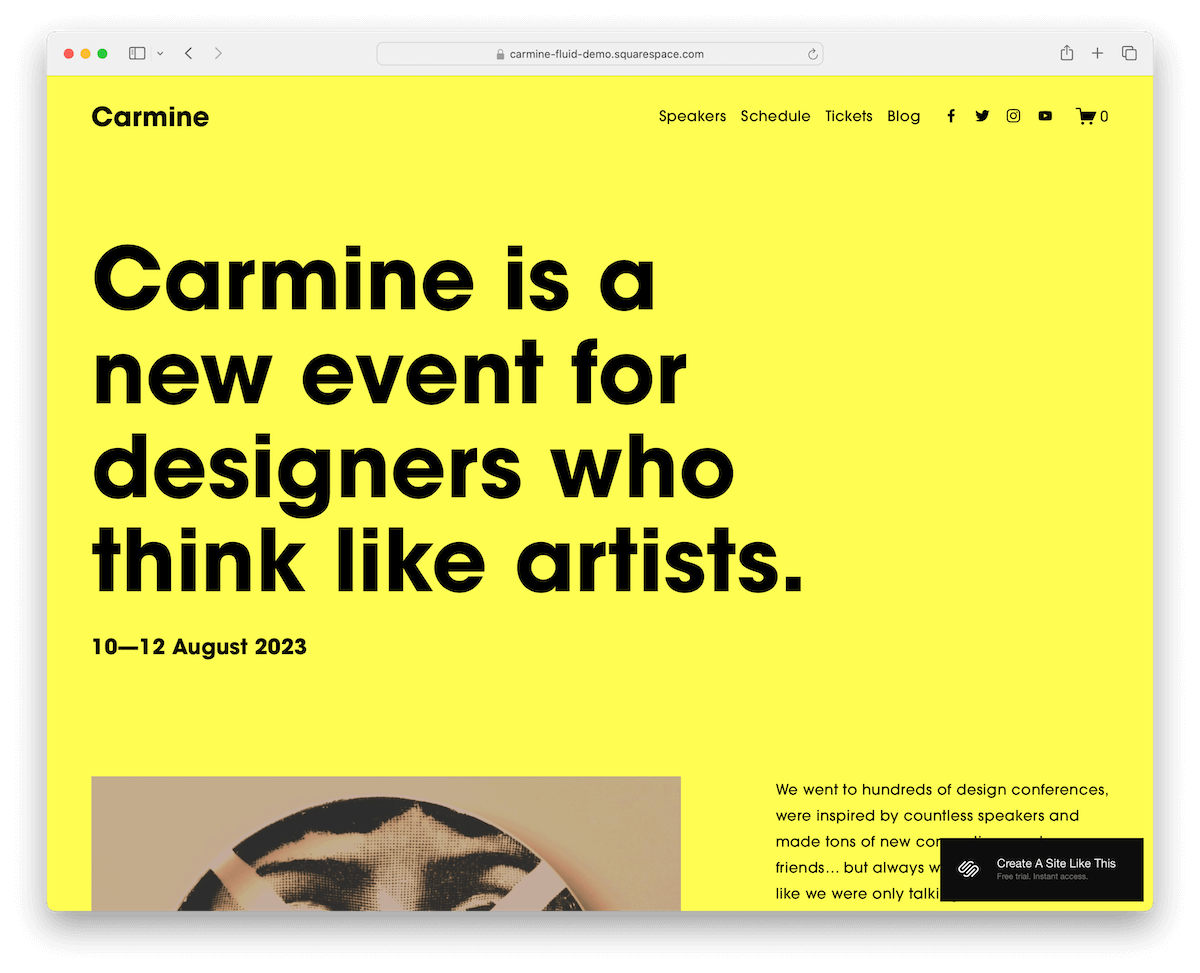
Carmine doesn’t shy away from color or bold text. It’s like a splash of vivid hues with typography that jumps right off the screen, making every word count more than the pictures.
Perfect if you’re all about the message.
Additionally, there’s a convenient option to purchase tickets online, making it ideal for events, conferences, and more.
The footer keeps you connected with social media links; there’s even a blog page to share your latest thoughts.
How To Make A Minimalist Website With Squarespace
Here’s a simplified tutorial on creating a minimalist website with Squarespace that works:
- Create a Squarespace account: Visit Squarespace and create an account. Pick a plan that suits you best and take full advantage of the free trial.
- Select your template: Browse the collection of minimalist templates above and choose the one that best suits your needs. (Remember, you can easily tweak it and make it your own.)
- Customize your design: Use Squarespace’s drag-and-drop editor to personalize your template. Focus on minimalist design principles – opt for a limited color palette, streamlined navigation, and ample whitespace. Keep your layout clean and clutter-free to ensure your content stands out.
- Simplify your content: Pare down your website’s content to the essentials. Craft concise, impactful text and use high-quality images that complement your minimalist aesthetic. Remember, in minimalism, every element should have a purpose and contribute to the overall UX.
- Optimize for mobile: Ensure your minimalist website looks great on all devices. Squarespace templates are responsive by default, but always preview your site on mobile and tablet views.
- Publish and test: Once satisfied with your minimalist Squarespace website, hit publish.
FAQs About Squarespace Minimalist Templates
Can I switch templates if I find one I like better?
Yes, you can switch templates at any time. Squarespace makes it easy to try out different templates until you find the perfect one for your site.
Are Squarespace minimalist templates mobile-friendly?
Yes. All Squarespace templates are designed to be responsive, ensuring your minimalist website looks great on any device.
Do minimalist templates support eCommerce?
Yes, many minimalist templates on Squarespace are equipped with eCommerce functionality, allowing you to create a sleek, clean online store.
Can I customize fonts and colors on a minimalist template?
Yes. Squarespace provides extensive customization options, including fonts and colors, to help you tailor your minimalist template to your brand.
How can I optimize my minimalist website for SEO?
Squarespace offers built-in SEO tools that let you add keywords, customize URLs, and more to help improve your site’s visibility on search engines.
Is it possible to add a blog to a minimalist Squarespace template?
Yes, adding a blog to your minimalist website is straightforward with Squarespace. You can either choose a template with built-in blog capabilities or add a blog page to your existing template.

Related Posts


Comments (0)