
50+ Site Speed Statistics: Page Load, CWV & Performance (2026)
A 100-millisecond delay can cut conversion rates by 7%, 53% of mobile visits are abandoned when a page takes longer than 3 seconds to load, and only 53% of mobile origins pass all three Core Web Vitals. With the median mobile page now weighing 2.6 MB and taking 7.9 seconds to fully load in HTTP Archive lab tests, site speed remains one of the most impactful — and most neglected — factors in web performance. Here are 50+ site speed statistics covering conversions, Core Web Vitals, page weight, mobile performance, and CMS comparisons for 2026.
Key Site Speed Statistics (2026)
- 53% of mobile site visits are abandoned if a page takes longer than 3 seconds to load (Google, 2016)
- A 100ms delay can cut conversion rates by 7% (Akamai, 2017)
- Median full page load in lab tests: 4.7s desktop / 7.9s mobile (HTTP Archive, September 2026)
- Median page weight: 2.6 MB mobile / 3.0 MB desktop (HTTP Archive, September 2026)
- Only 53% of mobile origins pass all three Core Web Vitals (Chrome UX Report via HTTP Archive, August 2026)
- Images are the heaviest resource type at ~0.9 MB of the median mobile page, ahead of JavaScript at 0.7 MB (HTTP Archive)
- 31% of websites sit behind a reverse proxy/CDN service, Cloudflare alone 26% (W3Techs)
Speed & Conversion Impact
| Mobile Load Time Goes From | Increase in Probability of a Bounce |
|---|---|
| 1s to 3s | +32% |
| 1s to 5s | +90% |
| 1s to 6s | +106% |
| 1s to 10s | +123% |
- A 2008 Aberdeen Group study found that a 1-second delay meant 7% fewer conversions, 11% fewer page views and a 16% drop in customer satisfaction; the study is old but remains the most-quoted figure on the topic (WPO Stats)
- 53% of mobile visits are abandoned when a page takes longer than 3 seconds to load (Google, 2016) — yet the median mobile page still needs 7.9 seconds to fully load in HTTP Archive lab tests
- Portent found that a B2B site loading in 1 second converts 3x better than one loading in 5 seconds, and an ecommerce site 2.5x better (Portent, 2022)
- Amazon found that every 100ms of added load time cost 1% of sales, a mid-2000s experiment that is still widely cited (WPO Stats)
- Walmart found in 2012 that every 1-second improvement in page load time lifted conversions by up to 2% (WPO Stats)
Core Web Vitals Statistics
| Metric | Good Threshold | % of Mobile Origins Passing |
|---|---|---|
| LCP (Largest Contentful Paint) | ≤ 2.5 seconds | 66% |
| INP (Interaction to Next Paint) | ≤ 200 milliseconds | 80% |
| CLS (Cumulative Layout Shift) | ≤ 0.1 | 83% |
| All three CWV | Pass all thresholds | 53% |
- Only 53% of mobile origins pass all three Core Web Vitals (60% on desktop) — LCP is the most common failure point, with only 66% meeting the 2.5s threshold on mobile
- INP replaced FID as a Core Web Vital in March 2024, measuring responsiveness more accurately — 80% of mobile origins pass the 200ms threshold, and 98% on desktop
- CLS (layout shift) has the highest mobile pass rate at 83%, helped by widespread use of explicit image dimensions and better font loading
- Core Web Vitals are a confirmed Google ranking factor since June 2021 — sites with good CWV see measurable ranking benefits
- The mobile CWV pass rate has climbed from 23% (January 2021) to 53% (August 2026), even though the bar changed when INP replaced FID in 2024
Page Weight Trends
| Year | Median Page Weight (Desktop) | Median Page Weight (Mobile) |
|---|---|---|
| 2015 | 1.2 MB | 0.8 MB |
| 2018 | 1.8 MB | 1.6 MB |
| 2020 | 2.0 MB | 1.8 MB |
| 2022 | 2.2 MB | 2.0 MB |
| 2024 | 2.5 MB | 2.2 MB |
| 2026 | 3.0 MB | 2.6 MB |
- Page weight has not plateaued: the median mobile page grew from 2.2 MB in January 2024 to 2.6 MB in September 2026 (3.0 MB on desktop)
- Images are the heaviest resource type at about 0.9 MB on the median mobile page, but image bytes have barely moved since 2018 (785 KB then)
- JavaScript is now driving the growth: median mobile JavaScript rose from 358 KB in 2018 to 689 KB in September 2026, while CSS sits at about 77 KB
- Modern image formats (AVIF and WebP) and lazy loading help explain why image weight has stayed flat while JavaScript nearly doubled
- The median page makes 70 requests on mobile and 76 on desktop, roughly where it has been since 2020
Mobile vs. Desktop Performance
| Metric | Desktop | Mobile |
|---|---|---|
| Median full page load (lab) | 4.7 seconds | 7.9 seconds |
| Median page weight | 3.0 MB | 2.6 MB |
| Share of web traffic (September 2026) | ~39% | ~59% |
| CWV pass rate | 60% | 53% |
| LCP pass rate | 79% | 66% |
| CLS pass rate | 74% | 83% |
- In HTTP Archive lab tests, mobile pages take about 1.7x longer to fully load than desktop (7.9s vs 4.7s median), while mobile carries nearly 59% of web traffic
- The mobile CWV pass rate (53%) trails desktop (60%), mainly because of slower LCP on mobile (66% vs 79%)
- Mobile-first indexing means Google ranks all sites based on mobile performance — desktop speed alone is insufficient
- Desktop is not better on every metric: desktop CLS pass rates (74%) trail mobile (83%)
CMS Performance Comparison
| Platform | CWV Pass Rate (Mobile) | CWV Pass Rate (Desktop) | Median Mobile Lighthouse Performance |
|---|---|---|---|
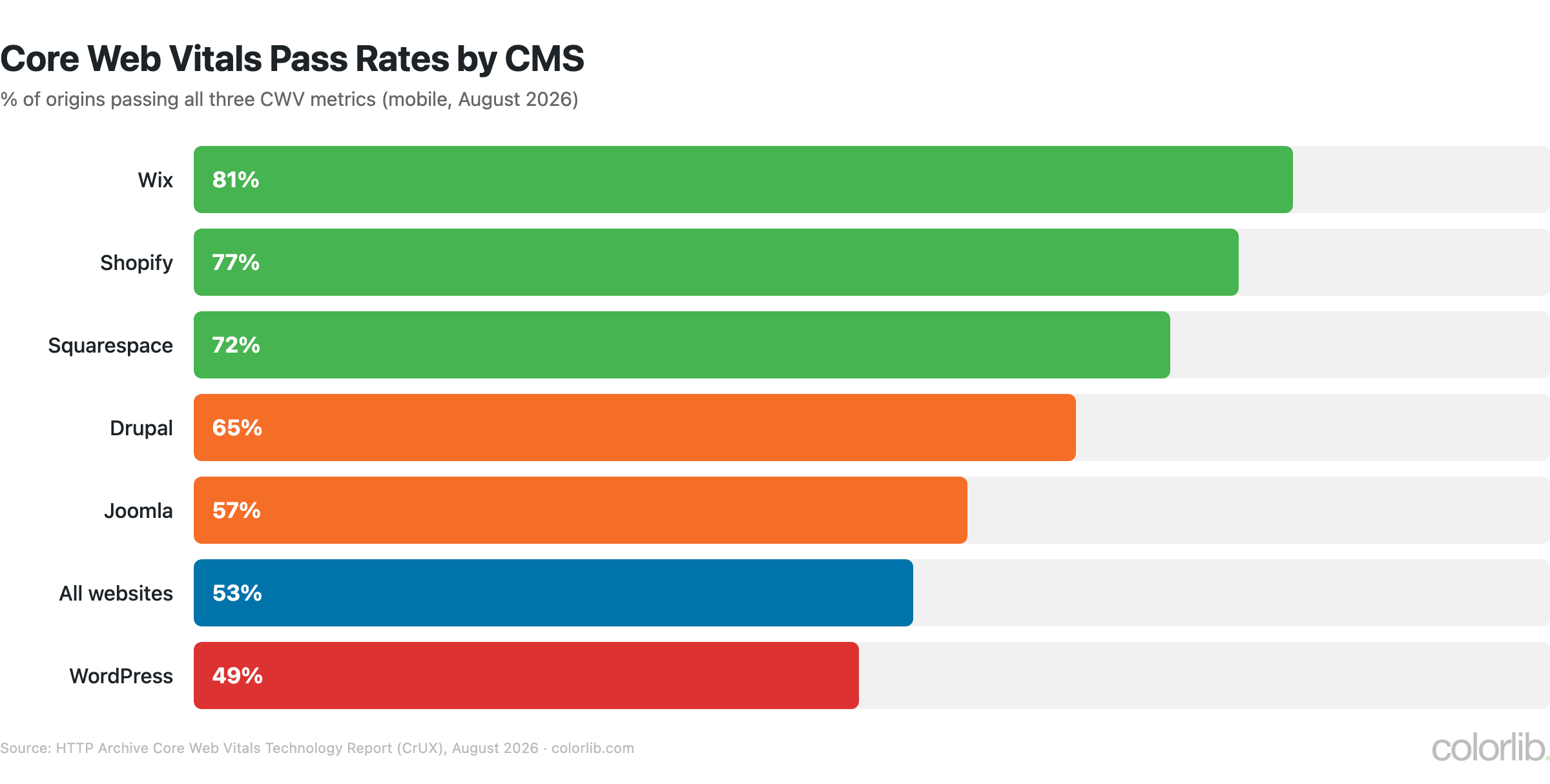
| Shopify | 77% | 79% | 48 |
| Wix | 81% | 87% | 61 |
| Squarespace | 72% | 66% | 29 |
| WordPress | 49% | 53% | 44 |
| Joomla | 57% | 59% | 43 |
| Drupal | 65% | 65% | 48 |
| All websites | 53% | 60% | 49 |
- Hosted platforms lead: Wix (81%) and Shopify (77%) have the highest mobile CWV pass rates of the major platforms, because the vendor controls hosting, CDN and much of the front-end code
- WordPress sites pass at 49% on mobile, below the web-wide average of 53% and behind Drupal (65%) and Joomla (57%)
- The wide variance in WordPress performance reflects hosting quality, theme choice, and plugin count more than the platform itself
- Wix has the highest median mobile Lighthouse performance score (61) in the table; Squarespace has the lowest (29) despite a 72% CWV pass rate, a reminder that lab scores and real-user field data measure different things
- For platform-specific details, see our WordPress statistics and CMS market share reports
Key Takeaways
- Speed directly impacts revenue. A 100ms delay can cut conversions by 7% (Akamai, 2017), and 53% of mobile visits are abandoned after 3 seconds (Google, 2016). For ecommerce, speed optimization is literally money on the table.
- Nearly half the web fails Core Web Vitals. Only 53% of mobile origins pass all three metrics, with LCP (66%) being the most common failure point.
- Mobile is still slower than desktop. Despite carrying nearly 59% of traffic, the median mobile page needs 7.9 seconds to fully load in lab tests — about 1.7x desktop and well above the 3-second abandonment threshold.
- Images are the heaviest resource; JavaScript is the fastest-growing. Images take about 0.9 MB of the median mobile page, so image optimization (AVIF, WebP, lazy loading) is still the easiest win, while median JavaScript has nearly doubled since 2018 to 689 KB.
- Platform choice shows up in field data. Wix (81%) and Shopify (77%) lead on mobile CWV pass rates; WordPress (49%) trails the web average, where hosting, theme and plugins decide the outcome site by site.
- Page weight is still growing. The median mobile page reached 2.6 MB in September 2026, up from 2.2 MB in January 2024, and makes about 70 requests.
Sources
- HTTP Archive — Loading Speed Report
- HTTP Archive — Page Weight Report
- HTTP Archive — Chrome UX Report
- Google — The Need for Mobile Speed (2016)
- Google/SOASTA — Mobile Page Speed Industry Benchmarks (2017, archived)
- Akamai — Online Retail Performance Report (2017)
- HTTP Archive — Core Web Vitals Technology Report
- Portent — Site Speed and Revenue Research
- Google — Core Web Vitals Documentation
Frequently Asked Questions
How fast should a website load?
Ideally, a website should load in under 2.5 seconds — that’s Google’s LCP (Largest Contentful Paint) threshold for “good” Core Web Vitals. Pages loading in 1-2 seconds have the best conversion rates. The 3-second mark is the critical abandonment threshold: Google’s 2016 research found 53% of mobile visits are abandoned beyond it. In HTTP Archive’s September 2026 lab tests, the median page fully loaded in 4.7 seconds on desktop and 7.9 seconds on mobile.
Does site speed affect SEO?
Yes. Core Web Vitals have been a confirmed Google ranking factor since June 2021. Sites that pass all three CWV metrics (LCP, INP, CLS) receive a ranking boost, though content relevance and backlinks remain stronger signals. Beyond ranking, faster sites get lower bounce rates, higher engagement, and better conversion rates — all of which indirectly improve SEO performance. For more, see our web design statistics report.
What percentage of websites pass Core Web Vitals?
Only 53% of mobile origins pass all three Core Web Vitals in August 2026 Chrome UX Report data (60% on desktop). Individually on mobile, 83% pass CLS, 80% pass INP, and 66% pass LCP. The mobile pass rate has risen from 23% in January 2021. Hosted platforms like Wix (81%) and Shopify (77%) have the highest pass rates, while WordPress sites average 49%.
How much does a 1-second delay cost?
A widely cited 2008 Aberdeen Group study put the cost of a 1-second delay at 7% of conversions, 11% fewer page views, and a 16% drop in customer satisfaction, and Akamai’s 2017 retail data found even a 100ms delay can cut conversion rates by 7%. Amazon’s mid-2000s experiments found every 100ms of latency cost 1% of sales. For a typical ecommerce store doing $1 million/year, a 7% conversion swing is worth roughly $70,000. The impact compounds on mobile, where Google found the probability of a bounce rises 32% as load time goes from 1 to 3 seconds. For CMS-specific performance data, see our CMS market share analysis.

Related Posts






Comments (0)