Engineers
Template Details
Author: Colorlib
Updated: October 2026 · v3.0.0
Credits: Images from Unsplash
Description
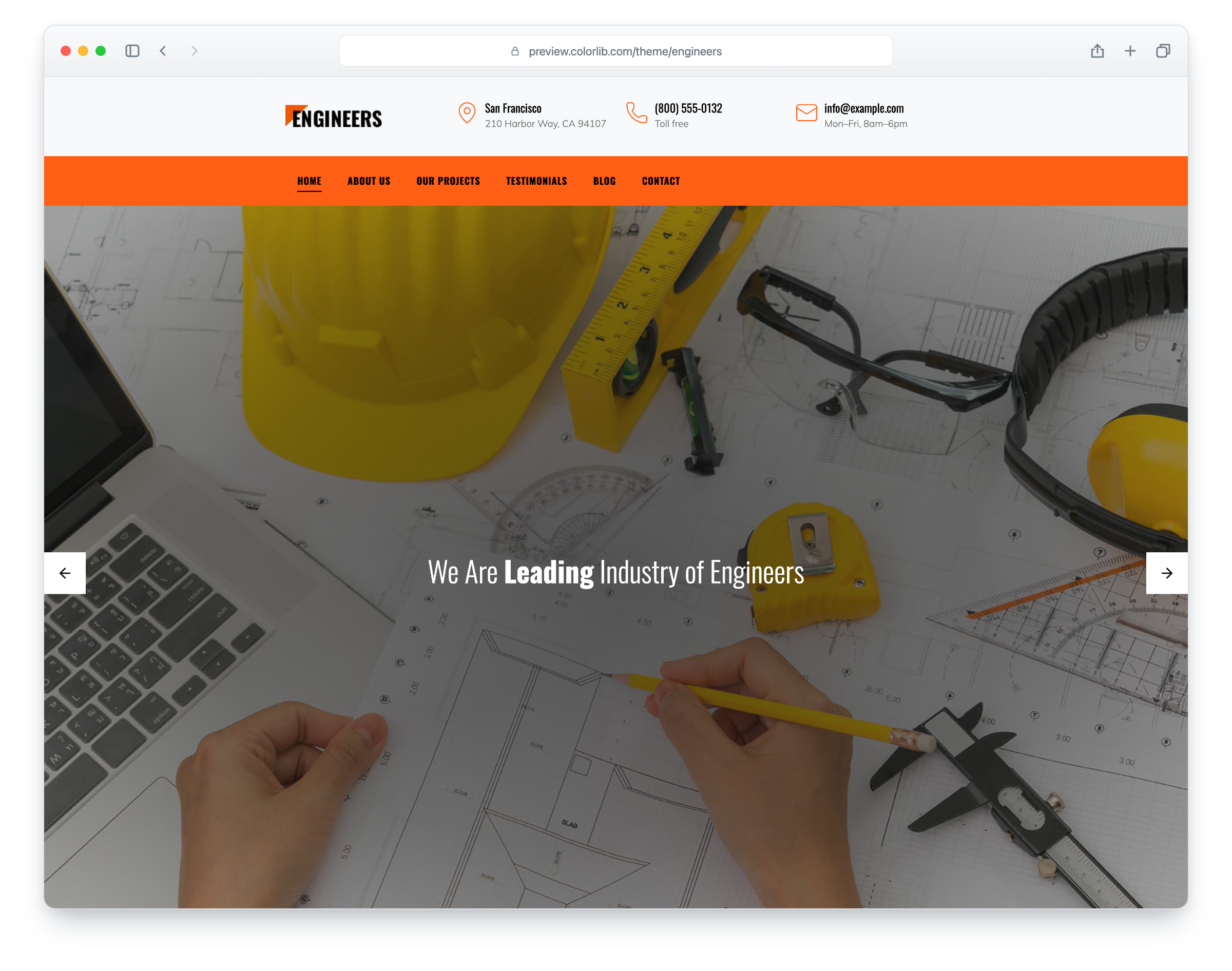
Engineers is a website template for engineering and construction companies, built on Bootstrap 5. It has eight pages: home, about, projects, a project page, testimonials, blog, a single blog post and contact. The layout is responsive and mobile-ready, and on larger screens the orange menu bar stays in view as you scroll.
The home page opens with a full-screen hero slider, followed by four numbered services, a “Why choose us” block, a request-a-quote form, a projects slider, testimonials, the latest blog posts and a newsletter band. The about page introduces the team, the projects page shows a grid of project cards that lead to the project page, and the blog post has comments, a comment form and a sidebar with search, categories and an author box. The contact page has a working contact form and three company values. Engineers gives you a ready-made site for an engineering firm, a building contractor or a construction company.
What’s new in 3.0
- Bootstrap 5.3.8 (the earlier release used Bootstrap 4.1.3 and jQuery), compiled from Sass with the template’s colours and the Bootstrap 4 proportions the design was drawn with, and plain JavaScript with no jQuery. Swiper 14 replaces Owl Carousel on the hero and projects sliders, a keyboard-operable dialog replaces the off-canvas mobile menu, a small built-in script keeps the menu bar in view, and Lucide SVG icons and a Font Awesome 7 Brands subset replace the IcoMoon and Flaticon icon fonts. Plugins that nothing used, such as jQuery UI, Stellar, a countdown, a date picker, a video background player, Magnific Popup and Slick, are gone. npm run build (Dart Sass and esbuild) compiles one minified stylesheet and one script.
- Lighter pages: the home page went from 2,634 KB and 43 requests to 819 KB and 21 requests, and the contact page from 1,580 KB and 35 requests to 393 KB and 11. Every photo has an AVIF version with the JPEG or PNG as the fallback, real dimensions and lazy loading below the fold, the hero photo is preloaded, and the full-page preloader is gone. The download went from 3.42 MB to 2.53 MB and includes the Sass sources, the AVIF copies, the fonts and the build tools.
- No third-party requests: Oswald and Mulish are self-hosted, the social logos are a small Font Awesome subset (the Twitter bird is now the X logo), and a Google Analytics 4 snippet stays commented out until you add your own ID. Before, every page loaded its web fonts from Google Fonts.
- Working forms: the request-a-quote form, the contact form, the blog comment form and the newsletter forms send through php/send-email.php, with validation, a spam trap, a recipient you set and an in-page message, and the mailer keeps visitor input out of the mail headers. Before, the contact page’s fields sat outside any form, so its Send button did nothing, and the other forms had no field names and posted nowhere.
- Accessibility: a skip link and landmarks on every page, one h1 per page with headings in order (the home page had two), a real menu button, a mobile menu that keeps keyboard focus inside and closes with Esc, labelled form fields, descriptive alt text, visible focus rings (they were switched off), project names and links that also show on keyboard focus (they showed on hover only), and sliders that pause on hover and keyboard focus and stop when reduced motion is set. Text meets WCAG AA contrast, with black text on the orange menu bar and newsletter band, a deeper orange for orange text and buttons on white, darker greys and a shade behind the white hero and page titles.
- Fixed: the three icons on the contact page never showed and now do, the search icon in the blog sidebar was blank, the projects slider arrows are 44 px (they were 40) with larger tap areas on the slider dots and one dot per project, and project cards, post titles, footer, category, pagination and social links now lead somewhere instead of #.
- Demo content: the header shows a fictional phone number, address and email, each testimonial has its own name (they all shared one), the contact page’s three values have headings that fit an engineering firm (they came from an education template), the blog categories fit the niche, and typos such as “Builings” and “Subcribe” are corrected. The body text stays placeholder copy.
Pricing Engineers
Single
$19
- Premium support
- Template updates
- For 1 year
- Access all templates
Membership
$129
- Premium support
- Template updates
- For 1 year
- For 1 year
Lifetime
$349
- Premium support
- Template updates
- For life
- For life
Featured in: 31 Best Free Construction Website Templates 2026
Similar Construction Templates View all 32 construction templates →