Megasis
Template Details
Author: Colorlib
Updated: October 2026 · v3.0.1
Credits: Images from Unsplash
Description
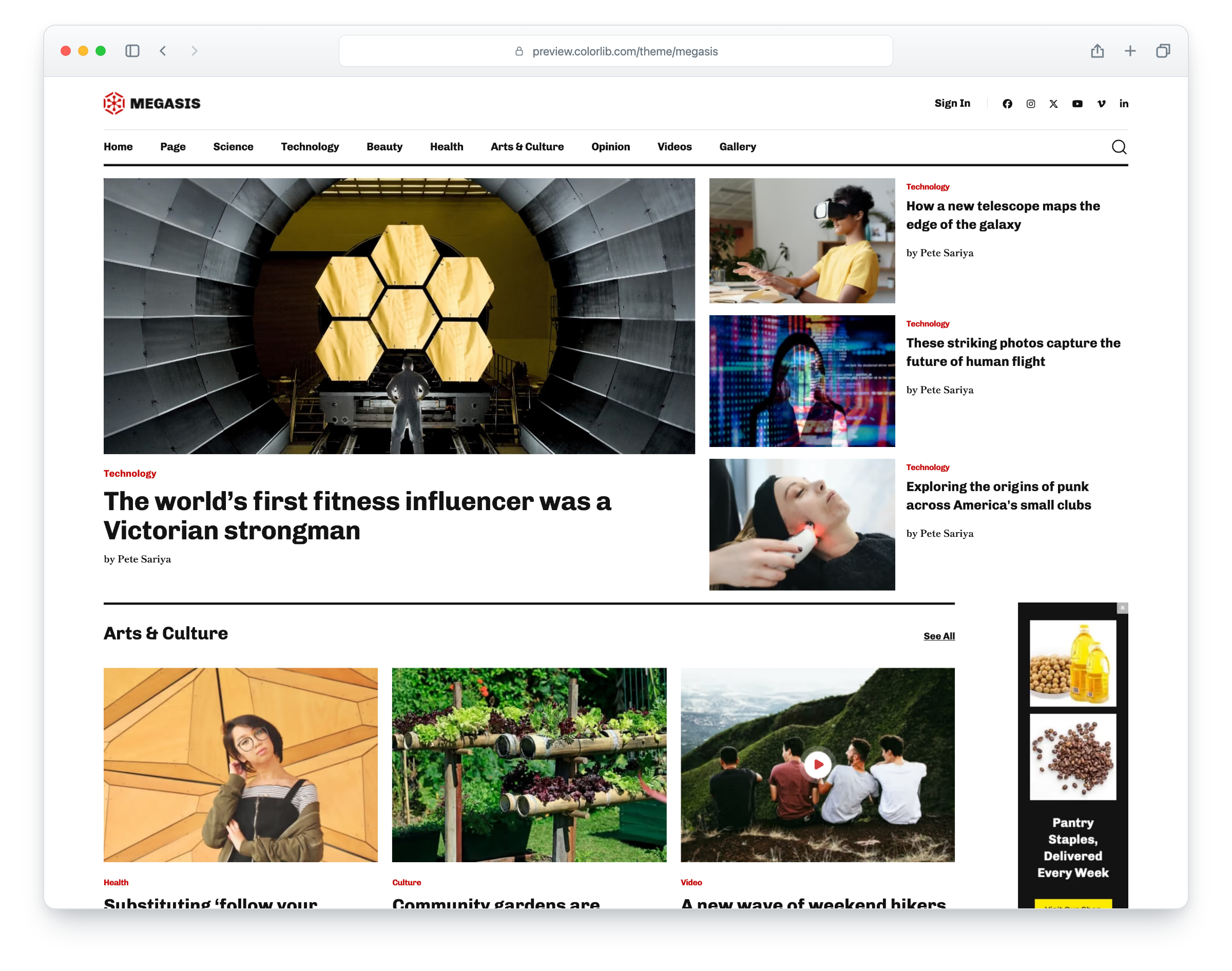
Megasis is a news and magazine website template, built on Bootstrap 5, with a clean, minimal layout for news sites, online magazines and editorial blogs. The layout is responsive and mobile-ready, and the header stays at the top of the screen as you scroll. There are nine pages: home, category, post, blog, blog post, contact, login, sign-up and elements.
The home page has a lead story with three side stories, an Arts & Culture section with a sidebar ad, Science Update cards, a video gallery, a Science Update slider, a banner ad and a newsletter sign-up. The inner pages add a category page with twelve story cards, an article with photos, share buttons and comments, a blog with a sidebar of categories, recent posts, tags and a newsletter form, a blog post with an author box and comments, login and sign-up pages, an elements page with typography, buttons, tables, forms and an image gallery with a lightbox, and a contact page with a working contact form and a map that loads on click. Megasis gives you a ready-made site for a news site or an online magazine.
What’s new in 3.0
- Bootstrap 5.3.8 (the earlier release used a trimmed Bootstrap 5.0 beta with jQuery 1.12 and a dozen plugins), compiled from Sass with only the parts the pages use, and plain JavaScript with no jQuery. Swiper 14 replaces Slick on the Science Update slider, a keyboard-operable dialog replaces the SlickNav mobile menu, PhotoSwipe replaces Magnific Popup in the elements gallery, the play buttons open a built-in video dialog, and the selects are native; Owl Carousel, WOW.js, animate.css and other plugins that no page used are gone. Lucide SVG icons and a 2.2 KB social-logo subset replace Font Awesome 5 and Themify (the Twitter bird is now the X logo). npm run build (Dart Sass and esbuild) compiles one minified stylesheet and one script.
- Lighter pages: all nine pages together went from 16.1 MB and 467 requests to 4.9 MB and 189 requests, and the download from 7.6 MB to 4.8 MB. Every photo has an AVIF version with the JPEG or PNG as the fallback, real dimensions and lazy loading below the first screen, each page’s first large photo loads first, and 80 unused WebP copies, other unused images and an unlinked stylesheet are gone.
- No third-party requests: Chivo and Shippori Mincho are self-hosted, the contact map is an OpenStreetMap map (no API key needed) that loads only when a visitor clicks “Show map”, the videos load from YouTube’s privacy-enhanced player only after a click, and an analytics snippet stays commented out until you add your own measurement ID. Before, the pages made requests to six outside hosts for web fonts, analytics and, on the contact page, a maps script with a sample key that showed only an error.
- Working contact form: the form on the contact page sends through includes/send-email.php without reloading the page, with validation, a spam trap and an in-page message (the old mail script put the visitor’s address into the email headers). The newsletter, comment and elements demo forms check their fields and thank the visitor, ready to connect to your mailing-list or comment service, and the header and sidebar searches open the category and blog pages.
- Accessibility: a skip link and a main landmark on every page, one h1 per page, a mobile menu that opens as a dialog, closes with Esc and returns focus to the MENU button, a Page submenu that also opens from the keyboard, names on icon-only links and buttons, story titles as the text of linked photos, labelled form fields, visible focus rings (the old CSS removed them), underlined in-text links, reduced-motion support and WCAG AA text contrast, with darker greys for dates, tags, comments, pagination and form fields and readable demo buttons on the elements page.
- Fixed: on phones the menu was a plain grey bar under the header (the shipped CSS had lost the theme’s menu styles); the MENU button now sits in the header as designed and opens the menu. The recent-post lists, the author box and the contact details stacked their photo or icon above the text and sit side by side again; the contact map, which showed only an error, now loads on click; the play buttons’ ripple animation runs; the elements page’s selects no longer show two arrows and its “Right Aligned” text is right-aligned; arrow and pin icons that drew nothing are back; and links that pointed to “#” now go to the matching pages.
- Demo content: neutral magazine headlines instead of filler that named real companies or made health claims, publishing copy instead of off-topic filler on the elements page, share buttons that are real links instead of pictures of logos, a fictional address, phone and email, a stock city clip for the videos, photos that showed brand markings replaced or retouched, and the two ad banners rebuilt for a fictional shop.
Pricing Megasis
Single
$19
- Premium support
- Template updates
- For 1 year
- Access all templates
Membership
$129
- Premium support
- Template updates
- For 1 year
- For 1 year
Lifetime
$349
- Premium support
- Template updates
- For life
- For life
Similar Templates